PTP Time Synchronization
The Precision Time Protocol (PTP, IEEE 1588) synchronizes clocks across a network to sub-microsecond accuracy — far beyond what NTP can achieve. Infix supports both the standard IEEE 1588 profile and the gPTP profile (IEEE 802.1AS) used in Time-Sensitive Networking. This post walks through the minimal configurations needed to get two devices talking PTP.
For the full story (protocol concepts, port states, boundary clocks, message format, Wireshark tips), see the PTP section of the User’s Guide.
Hardware Timestamping Matters
PTP accuracy depends critically on hardware timestamping: the NIC marks each packet with a precise timestamp as it crosses the wire, not in software where OS scheduling adds jitter in the hundreds of microseconds.
Before we start, from the UNIX shell, verify that your interface supports hardware timestamps:
1
2
3
4
5
6
7
8
9
10
11
12
admin@example:~$ sudo ethtool -T eth0
Time stamping parameters for eth0:
Capabilities:
        hardware-transmit     (SOF_TIMESTAMPING_TX_HARDWARE)
        software-transmit     (SOF_TIMESTAMPING_TX_SOFTWARE)
        hardware-receive      (SOF_TIMESTAMPING_RX_HARDWARE)
        software-receive      (SOF_TIMESTAMPING_RX_SOFTWARE)
        hardware-raw-clock    (SOF_TIMESTAMPING_RAW_HARDWARE)
PTP Hardware Clock: 0
Hardware Transmit Timestamp Modes:
        off                   (HWTSTAMP_TX_OFF)
        on                    (HWTSTAMP_TX_ON)
You want hardware-transmit and hardware-receive in the output. If you
only see the software-* variants, PTP will still run and the state machines
will work, but offsets will be in the millisecond range rather than nanoseconds.
Recommended Hardware
From the boards Infix officially supports, the Marvell CN9130 CRB
is the recommended choice. Its Marvell 88E6393X 11-port switchcore is driven
by the mv88e6xxx DSA driver, which has mature PTP hardware timestamping and
is exercised regularly with ptp4l.
The Marvell EspressoBIN (Armada 3720 with 88E6341 switch, same mv88e6xxx
driver) also works well for PTP and is considerably cheaper — it is not as
regularly tested but included in the aarch64*_defconfig and is a good choice
if you already have one.
The BPI-R3 and BPI-R4 are the most accessible boards, but the MediaTek MT7531
switch driver does not yet support hardware PTP timestamps; run ethtool -T
to verify before committing to a setup.
QEMU (the x86_64 virtual target) runs
ptp4land exercises the full configuration and state machine path, which is useful during development. But the virtual NIC only provides software timestamps, so do not expect nanosecond offsets there.
Ordinary Clock — Time-Receiver
The simplest setup: one device tracks time from another.
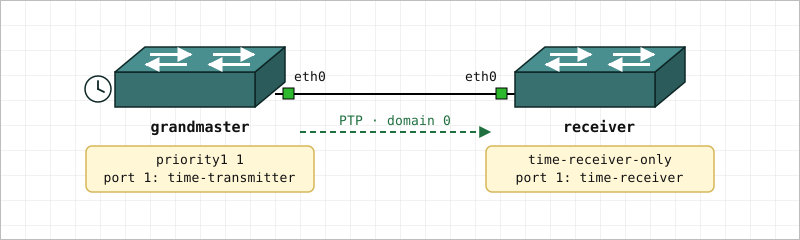 Figure 1: Two ordinary clocks, back to back on
 eth0. The
grandmaster wins the election on priority1, the receiver is pinned
with time-receiver-only.
Configure the time-receiver first.
1
2
3
4
5
6
7
admin@receiver:/> configure
admin@receiver:/config/> edit ptp instance 0
admin@receiver:/config/ptp/instance/0/> set default-ds domain-number 0
admin@receiver:/config/ptp/instance/0/> set default-ds time-receiver-only true
admin@receiver:/config/ptp/instance/0/> edit port 1
admin@receiver:/config/ptp/…/0/port/1/> set underlying-interface eth0
admin@receiver:/config/ptp/…/0/port/1/> leave
Ordinary Clock — Grandmaster
On the grandmaster side, lower priority1 values win the clock election.
Setting it to 1 ensures this device always wins when reachable.
1
2
3
4
5
6
7
8
admin@grandmaster:/> configure
admin@grandmaster:/config/> edit ptp instance 0
admin@grandmaster:/config/ptp/instance/0/> set default-ds domain-number 0
admin@grandmaster:/config/ptp/instance/0/> set default-ds priority1 1
admin@grandmaster:/config/ptp/instance/0/> set default-ds priority2 1
admin@grandmaster:/config/ptp/instance/0/> edit port 1
admin@grandmaster:/config/ptp/…/0/port/1/> set underlying-interface eth0
admin@grandmaster:/config/ptp/…/0/port/1/> leave
Connect eth0 on both boards with a direct cable or through a PTP-transparent
switch, then give it a few seconds to converge.
Verifying Synchronization
On the time-receiver, show ptp displays the live offset and path delay:
1
2
3
4
5
6
7
8
9
10
11
12
13
14
15
16
17
18
19
20
21
22
23
24
25
26
27
28
admin@receiver:/> show ptp
PTP Instance 0                          Ordinary Clock · domain 0
────────────────────────────────────────────────────────────────────
  Clock identity          : AA-BB-CC-FF-FE-11-22-33
  Grandmaster             : DD-EE-FF-FF-FE-44-55-66
  Priority1/Priority2     : 128 / 128
  GM Priority1/Priority2  : 1 / 1
  Clock class             : cc-time-receiver-only
  GM clock class          : cc-primary-sync
  Time source             : internal-oscillator
  Mode                    : time-receiver only
  PTP timescale           : yes
  UTC offset              : 37 s
  Time traceable          : yes
  Freq. traceable         : yes
  Offset from GM          : -42 ns
  Mean path delay         : 1250 ns
  Steps removed           : 1

────────────────────────────────────────────────────────────────────
Ports
PORT  INTERFACE          STATE                DELAY  LINK DELAY (ns)
   1  eth0               time-receiver        E2E                  0

────────────────────────────────────────────────────────────────────
Message Statistics  (▼ rx  ▲ tx)
PORT  INTERFACE             SYNC ▼  SYNC ▲  ANN ▼  ANN ▲  PD ▼  PD ▲
   1  eth0                      42       0     15      0     0     0
Port state is colour-coded in the live output — green for time-transmitter
and time-receiver, yellow for transient states, red for faults.
A port in time-receiver state with an offset in the tens-of-nanoseconds
range confirms that hardware timestamping is working. If the port stays in
listening, check the cable. If the offset is in the milliseconds, re-check
ethtool -T eth0 — you may be on software timestamping only.
gPTP / IEEE 802.1AS
For TSN networks, swap the profile on both devices to ieee802-dot1as. The
profile sets Layer 2 transport and P2P delay measurement implicitly, so no
per-port configuration is needed. Time-receiver side:
1
2
3
4
5
6
7
admin@receiver:/config/> edit ptp instance 0
admin@receiver:/config/ptp/instance/0/> set default-ds profile ieee802-dot1as
admin@receiver:/config/ptp/instance/0/> set default-ds domain-number 0
admin@receiver:/config/ptp/instance/0/> set default-ds time-receiver-only true
admin@receiver:/config/ptp/instance/0/> edit port 1
admin@receiver:/config/ptp/…/0/port/1/> set underlying-interface eth0
admin@receiver:/config/ptp/…/0/port/1/> leave
Set profile ieee802-dot1as with priority1 1 on the grandmaster side the
same way as the IEEE 1588 example above.
Saving the Configuration
Remember to save your changes for next boot:
1
admin@example:/> copy running-config startup-config
For boundary clocks, transparent clocks, multiple simultaneous instances, port interval tuning, and monitoring with Wireshark, see the User’s Guide.