Unattended Updates
Picture forty switches spread over a dozen substations. A new release
has just come out, and somebody has to log in to every one of them, run
upgrade, and reboot in a service window. Most of the time that
somebody would rather let the switches do it themselves.
Infix v26.09 introduces support for unattended updates. A unit follows a release feed on a schedule you set, and when a newer release shows up it installs it and either reboots or waits for you. You don’t need a script on the outside or a management agent to keep alive.
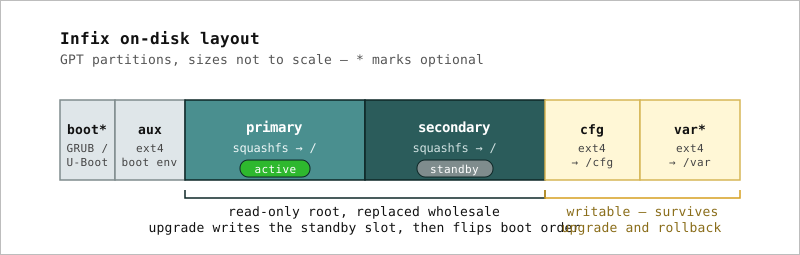 Figure 1: The A/B layout from Immutable by Design. An
upgrade writes the slot you are not running from and only then flips
the boot order.
Figure 1: The A/B layout from Immutable by Design. An
upgrade writes the slot you are not running from and only then flips
the boot order.
What makes this possible is the layout in Figure 1. An upgrade,
manual or not, goes to the inactive slot, so the release you are
running stays untouched in the other one. If the new release does not
work out, set boot-order takes you back to it with a reboot.
Automatic fallback, where the bootloader notices a failed boot and
switches back on its own, is in the works.
Getting Started
The factory configuration already follows the Infix releases on GitHub
and comes with two schedules, nightly and weekly, both
at 03:00. So all it takes is pointing the feature at one of them:
1
2
3
admin@example:/> configure system
admin@example:/config/system/> set software unattended-update schedule weekly
admin@example:/config/system/> leave
By default the unit installs the new release and then waits for you to reboot it. To have it reboot right away instead, so the whole update happens inside the window:
1
admin@example:/config/system/> set software unattended-update reboot immediate
Until automatic fallback is in place, save that for units you can easily reach if a release does not boot.
If you would rather only hear about new releases, point check-update
at a schedule instead. It reads the same feed and leaves a notice at
the next login and on the WebUI dashboard, but installs nothing.
Your Own Feed
The update source is a plain RSS or Atom feed, so following a fork, a
staging channel, or a feed of your own is a matter of changing
update-url. Any static web server will do, with the feed and the
.pkg files laid out the same way GitHub does it. The
documentation has an example feed.
That also gives you staged rollouts for free. Put a few canary units on a feed that gets the release first, and move the rest over a week later.
Checking the Status
show software tells you which schedule drives what, and how the last
check and install went:
1
2
3
4
5
6
7
8
admin@example:/> show software
...
Software updates
  Source       : https://github.com/kernelkit/infix/releases.atom
  Check        : nightly (daily at 03:00)
  Unattended   : weekly (sunday at 03:00), reboot manual
  Last check   : 2026-09-30T03:00:12Z, latest v26.08.1, up to date
  Last install : 2026-09-28T03:02:41Z, installed v26.08.1, reboot pending
The details end up in /var/log/messages, and the same status is in
the operational datastore for anything that polls over NETCONF or
RESTCONF. NETCONF and RESTCONF notifications for update events are
coming soon, so a management system will not have to poll at all.
Staying Current
Configure it once, and every unit keeps itself on the latest release, on your schedule and through your feed if you want one. The substations stay current, and the service window is somebody’s quiet Sunday night instead of a road trip. Try it on a unit or two, then let the rest follow.